When did pimple patches get this good?: How we created a TirTir x Murakami AI spec ad using NanoBanana Pro and Kling 3.0
A step-by-step breakdown of designing a fictional TirTir x Murakami beauty collab, generating it with AI, and animating it into a spec ad — prompts included.

You know the struggle.
You want to stay up to date, but the amount of information around AI tools, workflows, and what works best is overwhelming.
Every week there’s a new tool. Every day a new workflow.
And it’s hard to tell what’s actually useful.That’s exactly why we’re doing this series.
Instead of theory, we break things down into practical, replicable workflows — using fictional spec ads to show what’s possible, and how to actually get there.
For this week’s breakdown, we wanted to build something that sits right at the intersection of beauty, art, and product culture.
The idea started with one simple question:
When did pimple patches get this good?
Because this fictional TirTir x Murakami drop doesn’t feel like skincare in the traditional sense anymore.
It feels like something between a beauty product and wearable art.
So we wanted to see what that idea would look like as a full campaign.
For this workflow, we used:
- NanoBanana Pro for image generation
- Kling 3.0 for animation
Not a reader? Check out the interactive workflow at the end of the post.
Now, let’s get into it.
Step 1 — Designing the Core Product in NanoBanana Pro
Everything started with the product system.
Instead of generating one random beauty shot, the goal was to create something that feels like a believable limited-edition collab:
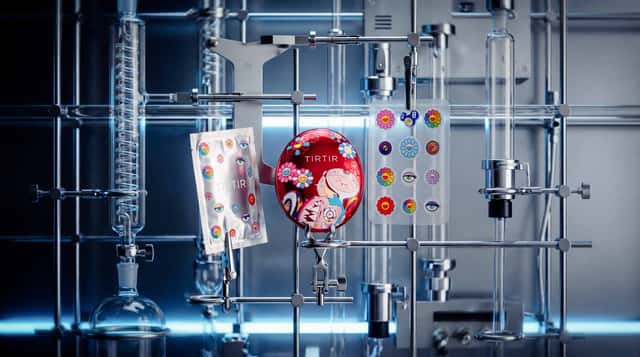
- silver foil patch sachets
- Murakami-style flowers and eyes
- a premium K-beauty product look
- a design language that could extend into more campaign assets later
The first image focused on the packaging itself.
Here the ready-to-copy prompt:
This became the base image for the whole visual direction.
Step 2 — Creating the Hero Product Shots
Once the packaging direction was locked, the next step was to build out the hero product imagery.
That included:
- the actual pimple patch sheet
- the cushion compact extension
- luxury close-up product shots that make the fictional collab feel more complete
Ready-to-copy prompt
Additional product extension prompt
Important: match the exact closed silhouette of reference image 2. The product must read as a single smooth closed compact, not an opened compact. No visible cut line across the middle unless it is extremely subtle like a real closed compact.
And for an even more premium beauty feel:
Step 3 — Building Campaign Frames
Once the core product was there, we expanded it into different campaign-style visuals.
The idea was to avoid making everything feel like the same studio render.
So we pushed the concept into a few different worlds:
- dark luxury editorial
- futuristic product setups
- realistic on-skin beauty closeups
That range makes the fictional campaign feel much more complete.
Ready-to-copy prompt
The Exact Product & Proportion (Crucial):
The silver foil sachet is the base object, tilted diagonally. Layered directly on top is the transparent pimple-patch sheet. The size of the patch sheet must be a perfect fit: it should cover approximately 90% of the sachet’s surface, meaning it is slightly smaller than the packaging but fills it almost completely, leaving only a thin silver border of the sachet visible around the edges.
The Design (Zero Variation):
The pimple-patch sheet must be an exact replicate of the reference image, featuring the specific arrangement of multicolored Murakami smiling flowers and stylistic eyes. No new characters, no rearranged stickers. The silver sachet must also feature the exact same rainbow flowers and the crisp white TIRTIR MURAKAMI EDITION logo.
Lighting & Atmosphere (Balenciaga Style):
A deep, cold midnight-blue and obsidian black void. The scene is lit by a sharp, focused beam of cool white light from above, creating a high-contrast, moody gradient on a polished black obsidian mirror floor. Harsh chiaroscuro lighting with extreme contrast. The transparent plastic of the sheet must have realistic light refraction and crystalline edges with sharp white specular highlights.
Composition:
Asymmetric, avant-garde, and mysterious. Extreme high contrast, shallow depth of field, raw cinematic grain, photorealistic, minimal and sophisticated.
Negative Prompt:
(Patch sheet too small, patch sheet too large, rearranged stickers, different design, 3D render, CGI, digital art, symmetric, centered, soft lighting, gray background, white background, cartoonish, plastic look, fake reflections, generic product shot, warm tones, yellow light).
Futuristic setup prompt
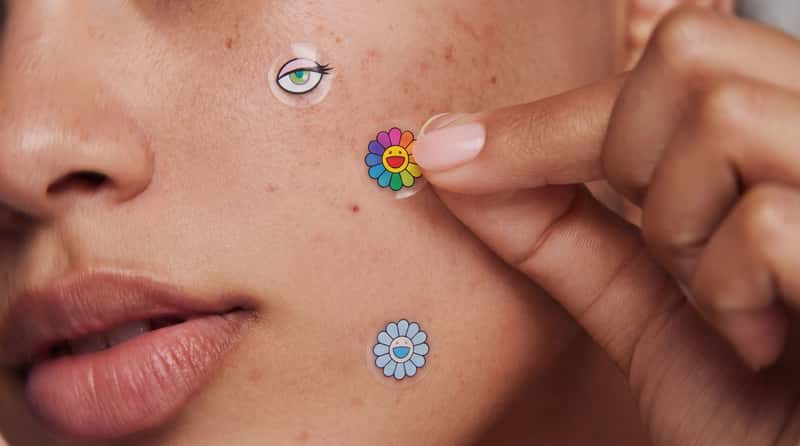
On-skin beauty prompt
Apply a Kodak Portra 400 film look: soft pastel palette, muted tones, creamy skin rendering, subtle warmth, authentic film grain, lifted shadows, gentle highlight rolloff, natural daylight balance, slightly desaturated greens and blues.
Ultra close-up macro shot of a woman’s cheek, mouth corner, and fingers. Hyper-realistic skin with visible natural texture: pores, fine peach fuzz, subtle freckles, small blemishes, light acne marks, tiny moles, and a natural oil sheen. No retouching, no smoothing, no plastic skin. Warm neutral skin tone, soft natural lipstick on the lower lip visible in the lower-left corner.
A hand enters from the right with a manicured nude or soft-pink nail, fingertip gently pressing one very small Murakami patch onto the cheek. Soft diffused daylight from the left, gentle shadows, shallow depth of field, sharp focus on the patch being applied.
Patch placement:
Upper-left cheek: very small transparent circular patch with a rainbow Murakami smiling flower.
Center being applied by fingertip: very small transparent circular patch with a Murakami cartoon eye design with long lashes and colorful iris.
Lower cheek near the mouth: very small transparent circular patch with a pastel blue or pink Murakami flower.
The patches should look like real hydrocolloid: slightly glossy, ultra-thin, semi-transparent edges blending into the skin, Murakami artwork printed crisply on top, sitting flush on the skin with a subtle shadow underneath. Scale all patches down significantly so they feel tiny, refined, and realistic, around the size of true acne spot patches, about 30–40% smaller than typical decorative beauty stickers.
Photorealistic editorial beauty photography, skincare campaign aesthetic, sharp high detail, Kodak Portra 400 softness and creamy tonal response.
Negative: no heart shapes, no pink translucent patches, no oversized patches, no large sticker-like patches, no airbrushed or plastic skin, no over-retouching, no text, no logos on skin.
Step 4 — Animate It in Kling 3.0
With the stills ready, we moved into Kling 3.0.
The goal here wasn’t to overcomplicate the motion.
Beauty ads usually benefit from small, controlled movement:
- slow zooms
- clean product reveals
- subtle camera motion
- realistic material behavior
Ready-to-copy prompts
For the compact reveal:
And for the next steps, the human beauty layer, you need to switch to Cinema Studio Video:
Interactive Node Workflow
If this was useful, you’ll like FAST FORWARD.
It’s our weekly signal on:
- emerging creative workflows and AI news
- standout AI + CGI work
- ideas you can actually apply
No noise. Just things worth paying attention to.